As an Amazon Associate this site earns from qualifying purchases.
Quick Picks
| Printer | Connection as listed | Best suited to | Link |
|---|---|---|---|
| TIMOZIA Bluetooth Shipping Label Printer | Bluetooth and USB; listing names iPhone, Android, Windows and Mac | Sellers who want phone printing plus a wired desktop fallback | Check Price on Amazon |
| SVANTTO Bluetooth Thermal Label Printer | Bluetooth, 4x6 thermal | Straightforward 4x6 shipping labels from a phone | Check Price on Amazon |
| Brother P-Touch PT-D460BT Business Expert Connected Label Maker | Bluetooth to TZe tape cassettes | Handheld organizing and asset labels, not shipping | Check Price on Amazon |
Disclosure: We earn a small commission from qualifying Amazon purchases at no extra cost to you.
As an Amazon Associate we earn from qualifying purchases. This page contains affiliate links, and we may receive a commission if you buy through them — at no extra cost to you.
As an Amazon Associate, we earn from qualifying purchases.
Last Updated: September 2026
Here is the short answer, because most guides bury it: to connect a Bluetooth label printer to your phone, you almost always pair inside the manufacturer's app, not in your phone's Bluetooth settings. Load paper, hold the power button until the status light blinks, open the brand's app, and let the app discover the printer. If you pair from the operating system's Bluetooth menu first, the app frequently cannot claim the connection and the printer sits there looking connected while printing nothing.
That one distinction solves the majority of "my label printer won't connect" problems. The rest of this guide walks the full sequence, covers Android and iPhone differences, and points to three printers whose Amazon listings actually advertise Bluetooth phone connectivity.
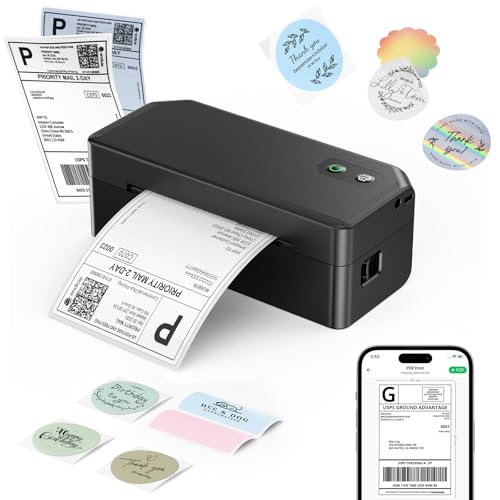
- Dual Connectivity Options: The SVANTTO Y42BT label printer supports USB connectivity for Windows, MacOS, and ChromeOS systems. It also connects via Bluetooth to iOS and Android
- Fast & Clear Printing: This thermal printer delivers high-speed printing at up to 180mm/s, capable of printing up to 72 4x6 shipping labels per minute. With direct thermal
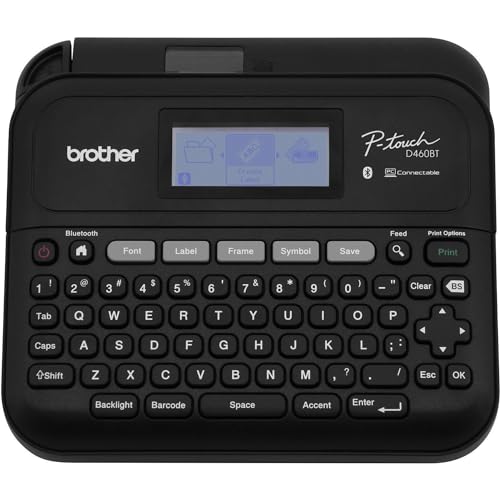
- Item Package Dimension: 12.28L x 8.89W x 3.81H inches
- Item Package Weight - 3.25 Pounds
The Problem: Two Different Devices, One Confusing Word
"Label printer" covers two machines that behave nothing alike, and that is where setup goes sideways.
One is a 4x6 thermal shipping printer that takes a fanfold stack or a roll and prints a full carrier label. The other is a handheld tape label maker that feeds a laminated cassette. Both say Bluetooth on the box. They use completely different apps and completely different label sizes.
Brother's listing describes TZe label tapes up to about 3/4 inch, not 4x6 shipping labels. If you bought that expecting to print USPS labels from your phone, no amount of pairing troubleshooting will fix it — you bought the other category. Check which machine you have before you blame Bluetooth.
Step-by-Step: Pair a Thermal Label Printer With Your Phone
- Load the labels first. Most thermal printers refuse to complete a self-test or stay awake with an empty paper path, and an auto-sleeping printer looks identical to a Bluetooth failure.
- Run the printer's calibration or feed routine. This is usually a long press of the feed button. It teaches the printer where each label ends, which prevents the classic half-label-per-page problem later.
- Install the manufacturer's app before touching Bluetooth. Search the app store for the exact brand and model printed on the unit, not a generic "label maker" app.
- Grant location and nearby-devices permission on Android. Android gates Bluetooth Low Energy scanning behind these permissions. Deny them and the app's device list stays permanently empty — this is the single most common Android pairing failure.
- Put the printer in pairing mode. Typically a press-and-hold until the indicator blinks rather than glowing steady.
- Pair from inside the app. Let the app scan and select the printer there. Do not add it in Settings > Bluetooth unless the manual specifically tells you to.
- Print the app's test label. If the test label prints but your shipping label does not, the problem is your label size setting, not the connection.
- Set the label size in the app to match the media you loaded. A 4x6 printer fed a 4x6 label but set to a different size will print misaligned output forever.
Pairing on Android vs iPhone
On Android, the sticking point is permissions. Nearby devices and location access must both be granted, and on many builds the app must be exempted from battery optimization or the OS will kill the Bluetooth session mid-job.
On iPhone, the sticking point is Bluetooth permission per app. Go to Settings, find the printer app in the list, and confirm Bluetooth is toggled on for that specific app. iOS also tends to reconnect to a previously paired label printer automatically, which is convenient until you own two printers and the phone grabs the wrong one.
Niimbot D110 and Phomemo Owners
These two models drive an enormous share of "label printer not connecting" searches, and this website has no verified listing data for either, so here is the honest version: we will not state specs for them.
What we can say is that both belong to the app-first category described above. The general fix pattern applies — remove any OS-level Bluetooth pairing you created, force-quit the app, power cycle the printer, reinstall the app if it still cannot see the device, and confirm the printer is not silently paired to a second phone in the house. A thermal printer that is already connected to another device will not advertise itself to yours.
Tools and Products You'll Need
You need three things: a Bluetooth-capable label printer, the correct label media for it, and the manufacturer's app. The printers below are the ones whose Amazon listings explicitly advertise Bluetooth connectivity to a phone.
TIMOZIA Bluetooth Shipping Label Printer — Best for sellers who want a phone connection and a wired backup
TIMOZIA's listing names iPhone, Android, Windows and Mac as compatible platforms for the TIMOZIA Bluetooth Shipping Label Printer, and describes both Bluetooth and USB connection. That dual-path design matters more than it sounds. When Bluetooth pairing goes wrong at 4pm on a shipping deadline, a USB cable to a laptop is a working fallback rather than a lost afternoon.
TIMOZIA's product listing identifies it as a 4x6 wireless label printer aimed at small business shipping. Reading that plainly: this is the option for someone batching carrier labels, not someone labeling pantry jars.
Pros: Listed Bluetooth plus USB connectivity; listing claims coverage of both mobile platforms and both desktop platforms.
Cons: The listing title is the only verified record available here. It does not publish print resolution, print speed, roll diameter capacity, or warranty length, so anyone who needs those numbers should read the manufacturer's own spec sheet before ordering. TIMOZIA is also not a name most buyers will recognize, which means less community troubleshooting to lean on when something goes wrong.
SVANTTO Bluetooth Thermal Label Printer — Best for a no-frills 4x6 phone-printing setup
The SVANTTO Bluetooth Thermal Label Printer, 4x6 Shipping Printer is listed as a Bluetooth thermal printer built around the 4x6 shipping label format. Thermal means no ink and no toner, which removes the most common consumable headache in home shipping setups.
Honestly, the listing here is sparse. That is a real limitation and worth saying out loud rather than dressing up.
Pros: Bluetooth and 4x6 thermal are both stated in the listing, which is the minimum combination this article's task actually requires.
Cons: The listing title does not state USB support, desktop operating system compatibility, print resolution or speed. If you need to print from a Windows machine as well as a phone, verify that with the manufacturer first — do not assume it.
Brother P-Touch PT-D460BT Business Expert Connected Label Maker | Connect and Create via Bluetooth on TZe Label Tapes up to ~3/4 inch, White — Best for organizing and asset labels from a phone
Different job entirely. The Brother P-Touch PT-D460BT Business Expert Connected Label Maker is listed as connecting and creating via Bluetooth on TZe label tapes up to roughly 3/4 inch. TZe tape is laminated, which is why this style of label survives cable bundles, bins and equipment tags rather than smudging off.
The practical read on that ~3/4 inch tape ceiling: it is sized for a line or two of text, not a scannable carrier label with a large barcode block.
Pros: Bluetooth phone connectivity on a mainstream, widely supported label maker platform with a consumable that is easy to find.
Cons: It cannot do the job most people searching for a Bluetooth thermal printer want. It takes proprietary TZe cassettes, which is an ongoing cost thermal roll printers avoid, and the listing does not publish battery life or print resolution.
Tips for Best Results
- Keep the phone within a few feet during the first pairing. Range problems masquerade as compatibility problems.
- Print one test label after every app update. App updates are the most common cause of a setup that worked last week and does not today.
- Store thermal rolls away from heat and direct sun. Thermal media darkens with heat, which is the whole printing mechanism.
- If you already own the printer and something seems unsafe, the CPSC maintains a public recall database you can search by product.
Common Mistakes to Avoid
- Pairing in the OS Bluetooth menu instead of the app. Start here when troubleshooting.
- Skipping calibration, then blaming the app for misaligned labels.
- Leaving the printer paired to a second phone or a laptop, so it never advertises to the device you are holding.
- Denying Android's nearby-devices permission and concluding the printer is broken.
- Buying a tape label maker when you needed a 4x6 shipping printer.
How We Research
This website does not do product research, and it runs no lab. For this guide, the product facts come from one source type: Amazon Creators API verified product records retrieved on 2026-09-05, which supplied each product's official listing title and ASIN. Where a specification is absent from those records — resolution, speed, warranty, battery life — this page says so instead of estimating it.
The setup procedure is separate from the product data. It reflects how Bluetooth Low Energy label printers are architected as a class, and it is written as generalized guidance, not as a claim about any one model's firmware.
Final Verdict
If you are here to print 4x6 shipping labels from a phone, the TIMOZIA Bluetooth Shipping Label Printer is the pick worth starting with, for one concrete reason from its listing: it names Bluetooth and USB alongside iPhone, Android, Windows and Mac, so a pairing failure does not stop you shipping. The SVANTTO Bluetooth Thermal Label Printer, 4x6 Shipping Printer is the simpler alternative if you only ever print from a phone and want fewer variables.
The Brother P-Touch PT-D460BT is the right machine for a different reader entirely — someone labeling shelves, cables and files who wants laminated tape and phone-side design. Buy it for that, not for shipping.
And the real verdict on setup: nine times out of ten, the fix is not the printer. It is the app permission you skipped.
Frequently Asked Questions
Do I need an app, or can I print straight from my phone? For nearly every consumer Bluetooth label printer, you need the manufacturer's app. These devices generally do not appear as standard system printers the way an office inkjet does.
Why won't my Phomemo label printer connect? Start with Android nearby-devices and location permissions, then confirm the printer isn't still paired to another phone. This website has no verified listing data for Phomemo models, so treat this as the general pattern rather than a model-specific instruction.
What do I do about Niimbot D110 app setup? Same sequence as any app-first label printer: install the app, grant Bluetooth and nearby-devices permission, put the printer in pairing mode, and pair inside the app. We hold no verified specification record for the D110 and will not state its features.
Can one Bluetooth label printer serve two phones? Generally one at a time. Most of these printers hold a single active Bluetooth connection, so disconnect the first device before pairing the second.
Is a tape label maker able to print shipping labels? No. Brother's listing describes TZe label tapes up to about 3/4 inch, not 4x6 shipping labels, which is far too narrow for a carrier label.
My labels print half-cut off. Is that a Bluetooth problem? No. That is a calibration or label-size problem. Run the printer's feed calibration and set the exact label dimensions in the app.
Related Resources
- Thermal label printer buying guide
- 4x6 label rolls vs fanfold stacks
- Label maker tape types explained
- USA.gov's consumer protection hub is the place to start if a seller will not honor a return on a printer that never paired.
Sources & Methodology
Nobody at this website physically or laboratory-tested these three printers; there was no bench, no stopwatch and no sample unit. What we did was pull the Amazon Creators API verified product record for each ASIN on 2026-09-05 and read the official listing titles closely — which is enough to establish connection type, label format and stated platform compatibility, and enough to catch the category mismatch between a TZe tape label maker and a 4x6 thermal shipping printer.
What it does not establish is print quality, pairing reliability or durability, because no owner-feedback themes or manufacturer spec sheets were supplied here. For a phone-pairing question specifically, that is a workable limit: connection type and app requirement are listing-level facts, while print performance is something you should verify against the manufacturer's own documentation before you buy.